Designing a Weapon That Survives Itself
"To every action there is always opposed an equal reaction." — Isaac Newton
Someone on a model page summed up the problem in one line: "At 100 percent power, the weapon shattered."
The print probably wasn't the problem. Think about what a hit actually is. Your weapon slams into the other robot, and the other robot slams right back into your weapon. Whatever force your weapon puts into the other robot comes straight back into your weapon at the same size, and your weapon is made of the same plastic as theirs.
So the question to design around is how hard you can hit and not shatter your weapon.
A bar or a disc
Most spinning weapons come in one of two shapes. There's a long bar with its weight out at the tips, and there's a disc with three or so bumps (lobes) around the edge.
You'll often hear that one shape gets more leverage than the other, but at the same overall diameter the tip travels the same distance from the center either way, so that explanation doesn't hold up. The real difference is where the material sits.
A bar gets thinnest right next to the hub, and that's where the bending stress is highest, so its weak point is built right into the shape. A three-lobe disc is basically a solid disc with bumps on it, so there's material carrying the load all the way around the hole in the middle where it mounts (the hub).
Three lobes also means three hits per spin instead of two, with a little less energy in each one. Less energy per hit means less peak stress in the plastic, which is what a printed part needs. You give up some damage per hit, and in exchange the weapon survives hitting things.
The cost is real, though. With less weight out at the tips, the weapon stores less energy and hits softer. In an all-plastic class that's usually worth it, because you're not trying to cut through steel. You're trying to break plastic and win on the judges' scorecard. If you're fighting metal robots in an open class, though, the bar is the better weapon.
Which way it lies on the print bed
How you lay the weapon on the print bed matters more than which shape you picked. If you only remember one thing on this page, this is the one to remember.
It's one setting in the slicer (the program that turns your model into instructions for the printer). Lay the weapon flat, and every hit runs along its layers. Stand it on its edge, and every hit pushes across the seams between layers, which is the weakest direction a printed part has.
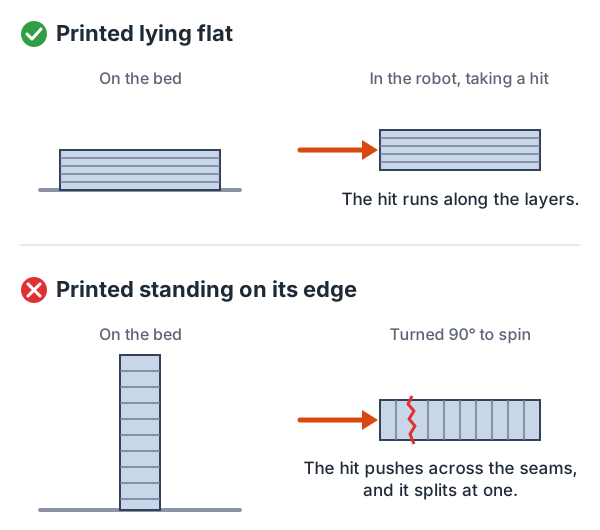
Every shape decision on this page comes after that one. Printing for Impact goes through the whole rule, including how to check for parts that are thinner than your walls.
Infill and corners
Infill is the lattice the printer fills the inside of a part with, and the percentage is how dense that lattice is. Print the weapon at 90 to 100 percent infill, which is close to solid plastic. The designer of one popular model runs exactly that on his blade, and the builder whose blade shattered came to the same conclusion.
The chassis wants the opposite, which is why general printing advice can sound like it contradicts itself. Both settings, and the reasons for them, are in Printing for Impact.
It's also worth rounding off every inside corner. A sharp corner where a lobe meets the hub is where cracks start, and a generous rounded corner (a fillet) there gives you free strength for a moment's work in CAD, the design software you draw the part in.
Setting a throttle limit
Remember, that blade shattered at 100 percent power.
Your radio lets you cap how much power the weapon ever gets, no matter how far you push the stick. That's the throttle limit. Start the season well below full and work it up a little at a time in a test box, not in a match. A weapon can't break from power you never send it.
Most radios also let you put that limit on a switch, so one position is your capped practice setting and the other is full power. Just check which way it's flipped before every match. The same trick helps with driving. Dual rates turn the drive down to something like 60 percent while a new driver is learning, and expo softens the stick near the center so small moves don't send the robot darting sideways.
Choosing motor speed
Motor speed turns out to be a durability decision as much as a power one. The energy stored in a spinning weapon goes up with the square of its speed. Double the rpm and you get four times the energy, and all of it comes back through the weapon when it hits.
That's why a slower motor is often the better choice for a printed weapon, even though every instinct says to go faster. Motors are rated in KV, roughly how many rpm they spin per volt. One builder running a common 5010 motor in a plastic one pound robot chose 360KV instead of 750KV, and the physics backs that choice. Four thousand rpm on a modest disc is still a serious weapon, while at eight thousand the weapon mostly just destroys itself.
You'll hear that spinners want tip speed, and that's true for metal weapons. For plastic it flips around, because your weapon is the part that loses.
Metal and after-treatments
When a printed weapon keeps breaking, the natural next thought is to reinforce it with metal or toughen the plastic after it comes off the printer. The rules usually close off both.
Metal reinforcement is the first one. Plastic-class rules generally let you use off-the-shelf parts for what they're normally for, and specifically ban using them as the part of the weapon that does the hitting. A metal sleeve inside a printed weapon is exactly what that rule is aimed at.
Treating the plastic after printing is the second. Annealing (baking it), acetone smoothing and boiling are common ways to toughen printed parts in the rest of the 3D printing world, and robot rules ban them outright. This one catches people because it's standard practice everywhere else. Your print settings and your design are the only things you get to adjust, and that's how the class is meant to work.
Spare weapons
Weapons break. That's normal in this sport, and it's a big part of why plastic is a good place to learn.
Print three copies.
Having a spare weapon in the pit turns a shattered blade into a ten-minute swap instead of a ruined competition. Printing two extras costs some filament and an evening you'd probably be spending at the printer anyway.
Another thing. Design the weapon so it's easy to swap. Picture it breaking in your first match, with your next match coming up soon. If getting it off means taking the wheels and motors apart, you probably won't make it in time, and you fight the next one without a weapon.
You want a few bolts out, the old one off, the new one on, and done.
Go deeper
Just 'Cuz Robotics' spinner design guide is the clearest page out there on the math behind spinners. Keep in mind it's written for metal weapons. Its tip speed targets, 200 to 250 mph with 300 as a ceiling, assume a weapon that can take what it dishes out, and a printed one can't. So read it to understand how speed, weight and energy trade off, not for numbers to aim at.
Two of its rules of thumb do carry over. Put 25 to 35 percent of the robot's weight into the weapon system, and pick a weapon ESC (its speed controller) rated about 20 percent above the motor's peak current. For plastic, staying under their speed range on purpose is the whole point, and the throttle limit above is how you do it. Module 7 works through the numbers for a plastic one pound robot, if you want to see where they land.
Ask Aaron covers weapon design across weight classes and shows the engineering behind it. It's the place to go when a rule of thumb here isn't enough anymore.
Comments ()